
Safer crossings and clearer charts
Wilderness confirmation, brief arrival protection, passage routing, clearer charts and a continuous desktop launch.
Live · 0.21.1 · 2026-10-04T05:21:02.400482+02:00
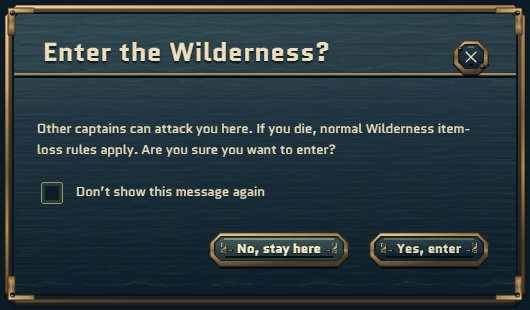
- Confirm before entering the Wilderness, with an optional remembered choice for your captain on this device.
- Get 15 seconds of Safe arrival protection after passage crossings or portal travel. Any offensive intent ends it immediately.
- Follow real passage arrows to browse neighbouring charts, and sail through passages when clicking water beyond a regional boundary.
- Treasure charts show your gold position marker only in the matching region. Region names remain hidden.
- See the outer rock walls on the M chart and minimap, and use the six portals from SAFE harbour water.
- Desktop launcher 0.16.5 keeps the studio introduction and game loading in the same window.
Version 0.21.1 is verified on Europa and the Steam default branch. This article describes the corresponding gameplay and interface changes.
Entering the Wilderness from outside it asks for confirmation before travel continues. Moving between Wilderness regions does not repeat the warning. No, close or Escape declines the crossing. You may choose Don’t show this message again and then Yes to remember that choice for this captain on this device. It does not remove the Wilderness combat and item-loss rules.
A successful passage crossing or portal arrival grants 15 seconds of Safe arrival protection against incoming player and NPC damage and aggression, shown by a shield and countdown. Selecting an attack target, throwing a hook, or attempting an offensive spell or Captain special ends it immediately. Reconnecting does not restart the countdown.
Before the regional transfer completes, the destination’s static scenery and authored NPC models are prepared. If loading fails, entry is not completed. Nearby player and NPC activity is still received from the current region.
Arrows mark the actual passage openings on the M chart and minimap. Click an arrow to open the neighbouring region’s chart. This only browses the map: it does not sail your ship or replace your waypoint.
Click navigable water beyond a regional boundary to sail towards it through the existing passage openings. The route follows connected passages; it cannot cross the rock walls. Normal combat and travel restrictions still apply at each crossing.
The chart frame includes the retained outer ridge geometry without stretching the original regional landscape. Poseidon’s north and east walls are visible, while the twelve real passage openings retain their positions.
Your treasure marker is hidden outside the destination region. The chart’s coastline, search cross and rarity rules still guide the hunt; there are no region labels. Map and treasure-window close buttons stay at the upper-right.
The six god-region portal arrivals are in SAFE harbour water. The 4,500 cargo Coin fee is unchanged; Wilderness regions have no paid portal destination.
Update and relaunch through Steam to use desktop launcher 0.16.5. The continuous intro-to-loading window applies to the next launch; no in-place update of a running application is claimed.
Fishing chances, treasure rarities and rewards, ship statistics and combat calibration are unchanged.