Diamond packs, sailing companions and Discord rewards
Choose a Diamond pack with a one-time account bonus, drag supplies into your pet’s storage and claim a chest for linking Discord. The update also fixes clipped panels, harbour trading and the camera pan.
Live · 0.30.8 · 2026-11-05T11:43:48Z
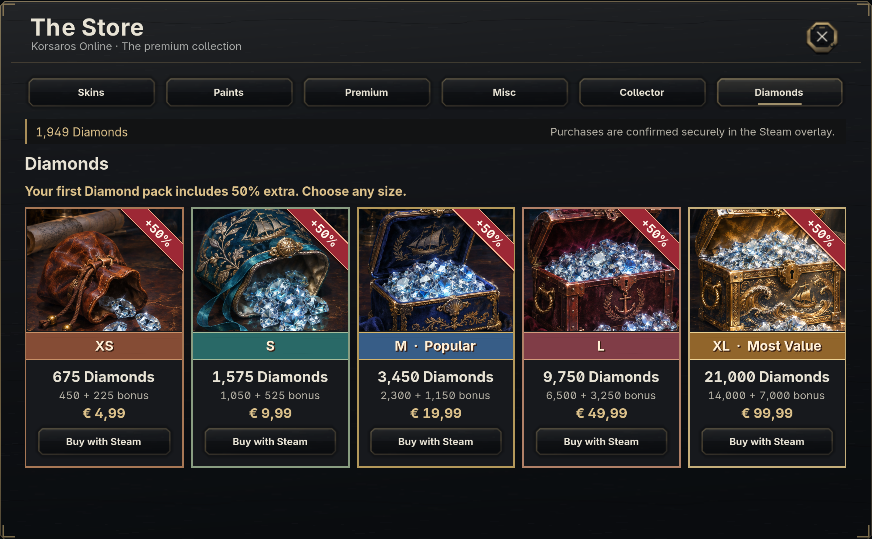
Five Diamond packs
Open the Store from Steam and choose Diamonds. The XS pack holds 450 Diamonds for €4.99, S holds 1,050 for €9.99, M holds 2,300 for €19.99, L holds 6,500 for €49.99 and XL holds 14,000 for €99.99. The middle card is marked Popular and XL is marked Most Value.
Your first completed Diamond-pack purchase earns 50% extra across your account. For example, M delivers 3,450 Diamonds and XL delivers 21,000. The store shows your eligibility, the bonus on each pack and the result after delivery. Earlier successful Diamond-pack purchases count. Buying Collector Edition leaves this bonus available. If checkout is interrupted, use Check saved purchase.
Diamond packs and Premium memberships now fit inside their frame. You can still spend your shared Diamond balance on 31, 93 or 365 days of Premium.
Companions and cargo
Your pet traces your sailing route about 0.8 seconds behind the ship, with a gentle bob on the water. In combat it waits about 1.5 seconds after your first actual shot before its opening attack.
Outside combat, drag cargo from your hold into pet storage, bring it back to the hold or rearrange the storage slots. Dragging supplies into and out of the regular bank also works.
Link Discord and collect your chest
Use /connect in the official Discord to receive a private, single-use code. In game, type /redeem followed by the code, then open Harbour Mail and choose Claim all. The letter includes one Common Treasure Chest and the Discord-blue in-game title The Discordian. Sailors who linked previously receive any missing reward.
The SERVER-EU indicator in Discord turns green when the EU game server is online and red when it is offline.
Harbours, camera and panels
The loading screen now uses the dark Hades archipelago and ship from the Steam Library artwork. The voyage progress meter stays visible, with a separate composition for narrow screens.
Open the Trading Center normally in port to see its regional item listings. The panel settles when it loads so you can work through offers. The Gold Market remains shared across regions.
Hold the middle mouse button and drag to pan the camera, or use WASD and the arrow keys. Click the wheel to centre on your ship. The middle-mouse pan has its own toggle in Settings. Skin previews stay steady while sailing and when your harbour status changes. The upper and lower edges of the Combat and Skills panels also fit inside their frames.